GPT Image 2.5, released September 8, 2026, replaces GPT Image 2 with two models: Flare (same token price, up to 50% lower latency) and Sunburst (tighter multi-turn edits). Token rates are unchanged, but the quality ladder was re-graded: 2.5 "max" costs what GPT Image 2 "high" did. On Arena's preliminary September 2026 board, Sunburst scores 1421 versus 1381 for GPT Image 2.
This comparison covers what OpenAI changed, how per-image costs compare across the two generations, how the three models performed on five identical prompts run through one queue, and which model to pick for each kind of job. All figures are current as of September 10, 2026, with links to the relevant sources.
What is GPT Image 2.5, and how is it different from GPT Image 2?
GPT Image 2.5 is OpenAI's image generation model family announced on September 8, 2026 as ChatGPT Images 2.5. Unlike GPT Image 2, which shipped as a single model on April 21, 2026, GPT Image 2.5 ships as two API models: gpt-image-2.5-flare and gpt-image-2.5-sunburst, both with a 2026-09-08 snapshot. Both are available on LoveGen AI under GPT Image 2.5 with a Flare/Sunburst toggle, alongside the original GPT Image 2.
OpenAI's launch post summarises the update as "sharper details, faster generation, more precise editing, and better tools for creating and sharing" (OpenAI via 9to5Mac, Sep 8, 2026). The company also states that Images 2.5 "produces more natural lighting and richer textures, is better at preserving the subjects in your reference photos, and follows editing instructions more reliably across multiple turns."
Flare vs Sunburst in one table
| GPT Image 2.5 Flare | GPT Image 2.5 Sunburst | |
|---|---|---|
| OpenAI positioning | Default model "for most applications" | "Premium visual workflows that benefit from tighter control across edits" |
| Quality vs GPT Image 2 | Higher, at "50% lower latency" | Higher, with "longer generation times" than Flare |
| Intended workloads | Creator and social content, product experiences, visual search, rapid prototyping, high-volume generation | Production campaign creative, polished product imagery, multi-round refinement |
| API id | gpt-image-2.5-flare | gpt-image-2.5-sunburst |
| Token pricing | Identical to GPT Image 2 | Identical to GPT Image 2 |
Source: OpenAI Developer Community announcement and OpenAI model pages.
What changed in GPT Image 2.5
Five things are new relative to GPT Image 2, according to the OpenAI announcement:
- Two models instead of one. Flare for speed, Sunburst for precision, priced the same per token.
- Two new quality tiers.
xhighandmaxsit abovehigh; GPT Image 2 stopped athigh. Both 2.5 models default toquality: auto(OpenAI image generation guide). - Targeted edits. OpenAI describes "comment-based edits to change only what you want" and "consistent details across multiple edits."
- Better reference-photo fidelity. Subjects from uploaded photos stay recognisable across new settings and styles.
- A new
opaquebackground option alongsideautoandtransparent.
In the ChatGPT app, Images 2.5 also adds a Sketch tool for drawing a rough layout, comments that target a specific area of an image, templates for formats such as posters and merch, and shareable prompts (The Decoder, Sep 2026). The Decoder also notes that outputs carry Google DeepMind's SynthID invisible watermark.
What stayed the same
The features that made GPT Image 2 notable in April 2026 carry over. GPT Image 2 was OpenAI's first image model with a reasoning step that plans a composition before rendering, could return up to eight coherent images from one prompt, and rendered non-Latin text such as Japanese, Korean, Chinese, Hindi, and Bengali far more reliably than its predecessors (OpenAI, Apr 2026; MacRumors, Apr 22, 2026). Those capabilities remain in Images 2.5.
Rate limits are also identical across all three API models. OpenAI lists Tier 1 at 100,000 tokens per minute and 5 images per minute, rising to 8,000,000 tokens per minute and 250 images per minute at Tier 5, on the gpt-image-2, Flare, and Sunburst model pages.
GPT Image 2.5 vs GPT Image 2: specs side by side
| Spec | GPT Image 2 | GPT Image 2.5 Flare | GPT Image 2.5 Sunburst | Source |
|---|---|---|---|---|
| Release date | April 21, 2026 | September 8, 2026 | September 8, 2026 | OpenAI |
| API id / snapshot | gpt-image-2 / 2026-04-21 | gpt-image-2.5-flare / 2026-09-08 | gpt-image-2.5-sunburst / 2026-09-08 | OpenAI model pages |
| Quality tiers | low, medium, high | low, medium, high, xhigh, max, auto | low, medium, high, xhigh, max, auto | OpenAI guide |
| Latency claim | Baseline | Up to 50% lower than GPT Image 2 | Longer than Flare | OpenAI |
| Custom resolution | Multiples of 16, max edge 3840 px, 655,360 to 8,294,400 total pixels | Same | Same | OpenAI guide |
| Aspect ratio range | 1:3 to 3:1 | 1:3 to 3:1 | 1:3 to 3:1 | OpenAI guide |
| Background options | auto, transparent, opaque | auto, transparent, opaque | auto, transparent, opaque | fal.ai schema |
| Reasoning ("thinking") step | Yes | Yes | Yes | OpenAI, Apr 2026 |
| Text input / image input / image output | $5 / $8 / $30 per 1M tokens | $5 / $8 / $30 per 1M tokens | $5 / $8 / $30 per 1M tokens | OpenAI model pages |
| Arena text-to-image score (Sep 2026) | 1381 ± 4 (medium, 78,731 votes) | 1399 ± 13 (2,856 votes, preliminary) | 1421 ± 13 (3,149 votes, preliminary) | Arena |
| Artificial Analysis rank (Sep 10, 2026) | #1, Elo 1171 (high) | Not yet listed | Not yet listed | Artificial Analysis |
| Reference images on LoveGen AI | Up to 4 | Up to 6 | Up to 6 | LoveGen AI model pages |
| Max size on LoveGen AI | 2K | 3840×2160 | 3840×2160 | LoveGen AI model pages |
| Credits on LoveGen AI | 0.3 per image, flat | 0.1 to 3.4 by quality and size | Same as Flare | LoveGen AI model pages |
OpenAI's guide flags resolutions above 2560×1440 as experimental for every model in the family, and recommends 1024×1024, 1536×1024, or 1024×1536 as the standard sizes (OpenAI image generation guide).
Does GPT Image 2.5 cost more than GPT Image 2?
Per token, no. Per image, the answer depends on which quality tier you pick, because OpenAI re-graded the ladder. GPT Image 2.5 at high produces an image that costs roughly what GPT Image 2 produced at medium, and GPT Image 2.5 at max costs roughly what GPT Image 2 produced at high.
Same token rate card
All three models bill $5 per million text input tokens ($1.25 cached), $8 per million image input tokens ($2 cached), and $30 per million image output tokens, according to the gpt-image-2.5-flare and gpt-image-2.5-sunburst model pages, which state that "token rates match GPT Image 2." The same pages warn that OpenAI's GPT Image 2 cost calculator "does not estimate GPT Image 2.5 token consumption," which is the first hint that the number of output tokens per image has changed.
The quality ladder was re-graded
fal.ai publishes a fixed per-image price for each quality and size combination on both models, which makes the shift easy to see. The figures below are fal.ai list prices as of September 9, 2026.
| Quality tier | GPT Image 2, 1024×1024 | GPT Image 2.5, 1024×1024 | GPT Image 2, 3840×2160 | GPT Image 2.5, 3840×2160 |
|---|---|---|---|---|
| low | $0.006 | $0.006 | $0.012 | $0.011 |
| medium | $0.053 | $0.013 | $0.101 | $0.026 |
| high | $0.211 | $0.053 | $0.401 | $0.100 |
| xhigh | not available | $0.094 | not available | $0.178 |
| max | not available | $0.211 | not available | $0.400 |
Sources: GPT Image 2 on fal.ai and GPT Image 2.5 Flare on fal.ai. Flare and Sunburst share one price list on fal.ai (Sunburst page).
Read down the GPT Image 2.5 column and the pattern is clear: high on 2.5 ($0.053) matches medium on GPT Image 2 ($0.053), and max on 2.5 ($0.211) matches high on GPT Image 2 ($0.211). The Decoder reached the same conclusion, noting that the 2.5 max tier "matches Images 2.0's high-tier cost" (The Decoder). In practice, OpenAI inserted two cheaper rungs below the old top tier rather than adding two more expensive rungs above it.
What this means if you migrate an existing integration
A request that used gpt-image-2 with quality: "high" and simply swaps the model id to gpt-image-2.5-flare will keep quality: "high" and spend about a quarter of the output tokens it did before. That is a cost saving of roughly 75% at 1024×1024 ($0.211 to $0.053 on fal.ai list price), but it is also a different amount of rendering work. Teams that want the same output token budget as before should set quality: "max". Teams that relied on the default should note that GPT Image 2.5 defaults to auto in OpenAI's API (OpenAI guide) and to high on fal.ai (fal.ai schema).
Credit cost on LoveGen AI
On LoveGen AI, GPT Image 2 is a flat 0.3 credit per image with up to four reference images and 2K output. GPT Image 2.5 is priced by quality and size, starting at 0.1 credit. At the default 1024×1024, Low is 0.1, Medium 0.2, High 0.5, Extra High 0.8, and Max 1.8 credits. A 3840×2160 render runs from 0.1 credit at Low to 3.4 credits at Max. Flare and Sunburst cost the same, and every size from 1024×768 through 1920×1080 and 2560×1440 to 3840×2160 is available in landscape and portrait, with an optional transparent PNG background.
Hands-on: 5 prompts, 3 models, one platform

On September 10, 2026, two days after launch, we ran five fixed prompts through GPT Image 2 and both GPT Image 2.5 models on fal.ai's queue API, so all three shared one provider, one queue, and one clock. We tested four configurations: GPT Image 2 at high (the baseline most integrations use today), Flare at high (what a plain model-id swap gets), and Flare and Sunburst at max (cost-matched to the baseline at $0.211 per 1024×1024 image on fal.ai list price). The run produced 33 images with no failures and cost about $6 at list price.
Test protocol
- Sizes: 1024×1024 for Tests 1, 2, 3, and 5; 3840×2160 for Test 4, submitted as explicit width and height.
- Timing: wall-clock seconds from queue submission to a completed result. The four configurations were submitted in parallel; queue wait never exceeded 3 seconds, so the figures are effectively processing time on fal.ai. Test 5 is the median of 3 runs; every other figure is a single run and is labelled as such.
- Reference image: one navy ceramic mug with a white mountain logo on a white background, generated once with Flare at
highand reused as the identical input for every model in Tests 2 and 3. - Scoring: Test 1 counts correct characters out of 37 across five strings. Tests 2 and 3 count unintended changes to the mug, its logo, and the background across the chain. Test 4 compares a 1024×640 crop at 100% around the cabin. Test 5 checks whether all three runs are usable as a thumbnail.
- Caveat: fal.ai's queue adds its own overhead, and LoveGen AI routes GPT Image 2 through a different provider than GPT Image 2.5, so absolute times on other platforms will differ. The ratios between models are the useful signal.
Test 1: multilingual poster text
The prompt asked for a flat-vector café poster with five exact strings: "MORNING BREW", 每日现磨咖啡, 毎朝焙煎, "$4.50", and "Open 7am - 6pm", plus a price tag in the lower right. All four configurations rendered all 37 characters correctly and placed the price tag where requested. Flare at max appended a stray period after the headline and after the opening hours; the other three were clean. GPT Image 2 took 116.0 seconds, Flare at high 26.0 seconds, Flare at max 54.5 seconds, and Sunburst at max 96.1 seconds (single run). Text rendering, the headline strength of GPT Image 2 in April 2026, carries over to 2.5 intact, and it is not a reason to choose either generation over the other.
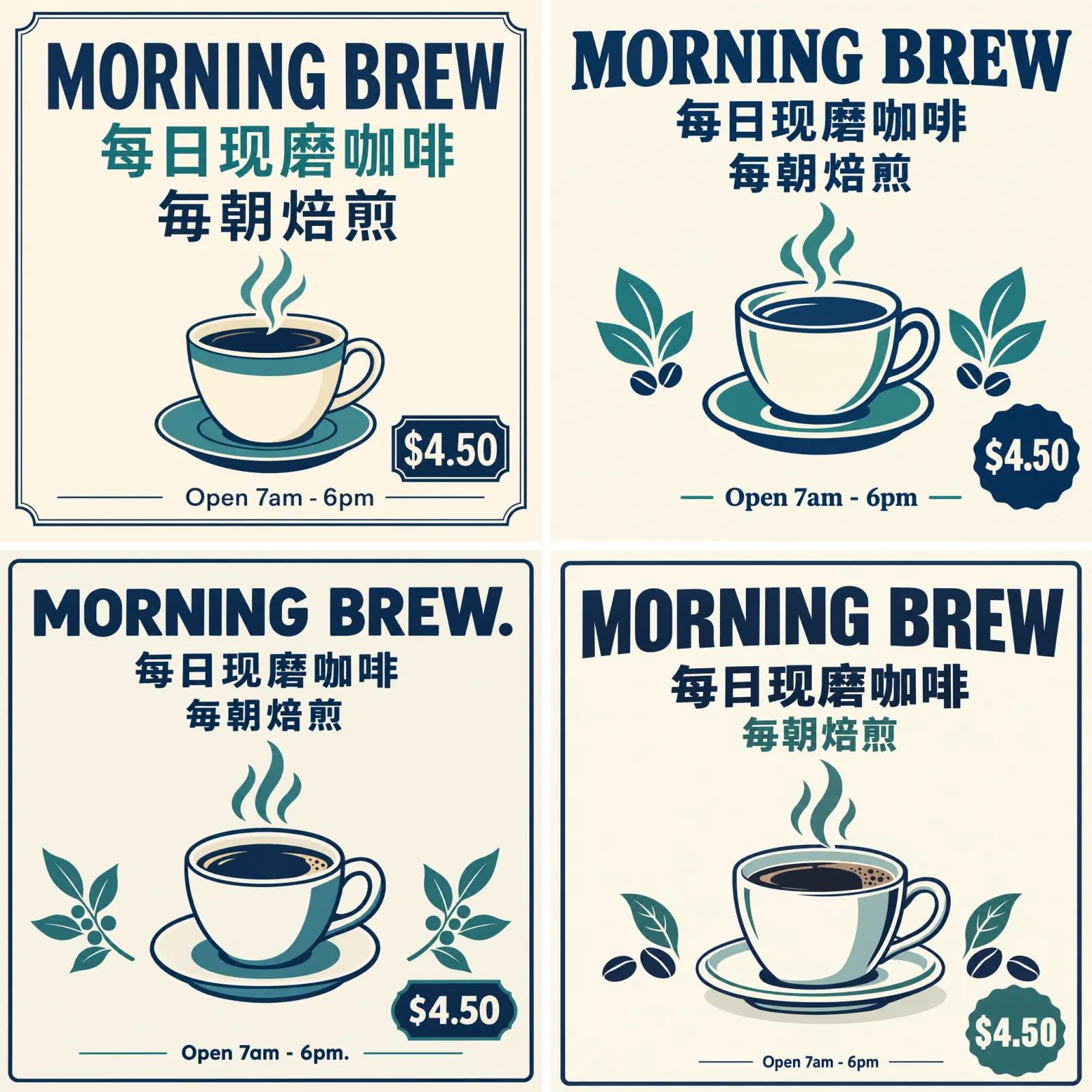
Top left: GPT Image 2 (high). Top right: GPT Image 2.5 Flare (high). Bottom left: GPT Image 2.5 Flare (max). Bottom right: GPT Image 2.5 Sunburst (max).
Test 2: product edit from a reference image
Each model received the same mug image and the instruction to place it on a white marble counter beside a window in soft morning light while keeping the shape, colour, handle position, and logo unchanged. All four kept the logo, colour, and handle. The three GPT Image 2.5 outputs matched the reference proportions; GPT Image 2 rendered the mug slightly squatter than the source. Times were 137.2 seconds for GPT Image 2, 36.6 for Flare at high, 68.9 for Flare at max, and 107.9 for Sunburst at max (single run). On a one-shot reference edit, every configuration is production-usable.
Test 3: three-turn edit chain
Starting from each model's Test 2 output, turn two asked for a croissant on a plate to the right of the mug and nothing else; turn three asked to change only the lighting to warm evening lamp light. We counted every change that was not requested.
- GPT Image 2 (high): turn two re-rendered the whole scene. The mug moved left and shrank, and the plant and cutting board changed position. Turn three kept that new layout but redrew the view through the window. Four unintended changes; about 136 seconds per turn.
- Flare (high): turn two added a faint fabric-like grain to the mug surface and nothing else moved; turn three changed only the light. One unintended change; about 30 seconds per turn.
- Flare (max): the mug surface drifted from matte to a cross-hatched grain over the two turns, and the plant and window frame shifted on both. Four unintended changes; about 62 seconds per turn.
- Sunburst (max): the layout, mug, plant, canister, and board stayed fixed across both turns. Only the croissant and the lighting changed. Zero unintended changes; about 107 seconds per turn.
Sunburst delivered exactly what OpenAI promised for multi-round work. The surprise was Flare at max, which drifted as much as GPT Image 2 in this single chain, while Flare at high held steady. One chain is not a statistic, but it is a reason to test both Flare tiers on your own edit sequences before assuming that the higher tier is safer.
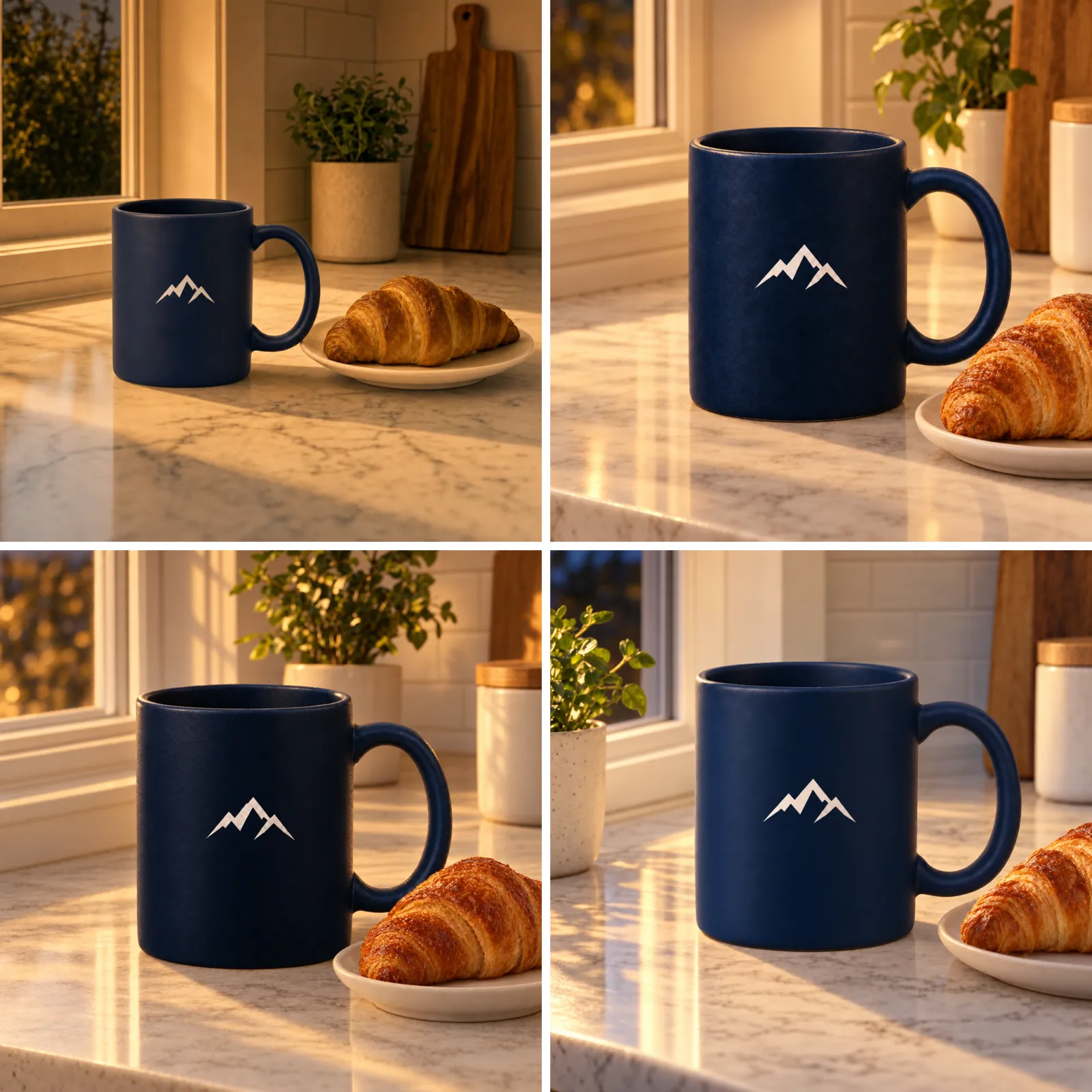
Final frame of the chain. Top left: GPT Image 2 (high). Top right: GPT Image 2.5 Flare (high). Bottom left: GPT Image 2.5 Flare (max). Bottom right: GPT Image 2.5 Sunburst (max).
Test 4: 4K landscape detail
All four configurations returned an exact 3840×2160 image of the fjord scene. Scaled to fit a screen, the four are hard to tell apart. At a 100% crop around the cabin, Sunburst at max is the sharpest, with readable lichen on the rocks, corrugation on the roof, and individual railing planks. Flare at max is close behind. GPT Image 2 at high renders the cabin's siding crisply but leaves a painterly smear across foliage and rock. Flare at high is visibly softer throughout, which is expected at a quarter of the output tokens. Times were 105.4 seconds for GPT Image 2, 31.0 for Flare at high, 75.1 for Flare at max, and 91.5 for Sunburst at max (single run). fal.ai list prices for these renders are $0.401, $0.100, $0.400, and $0.400 respectively (fal.ai).
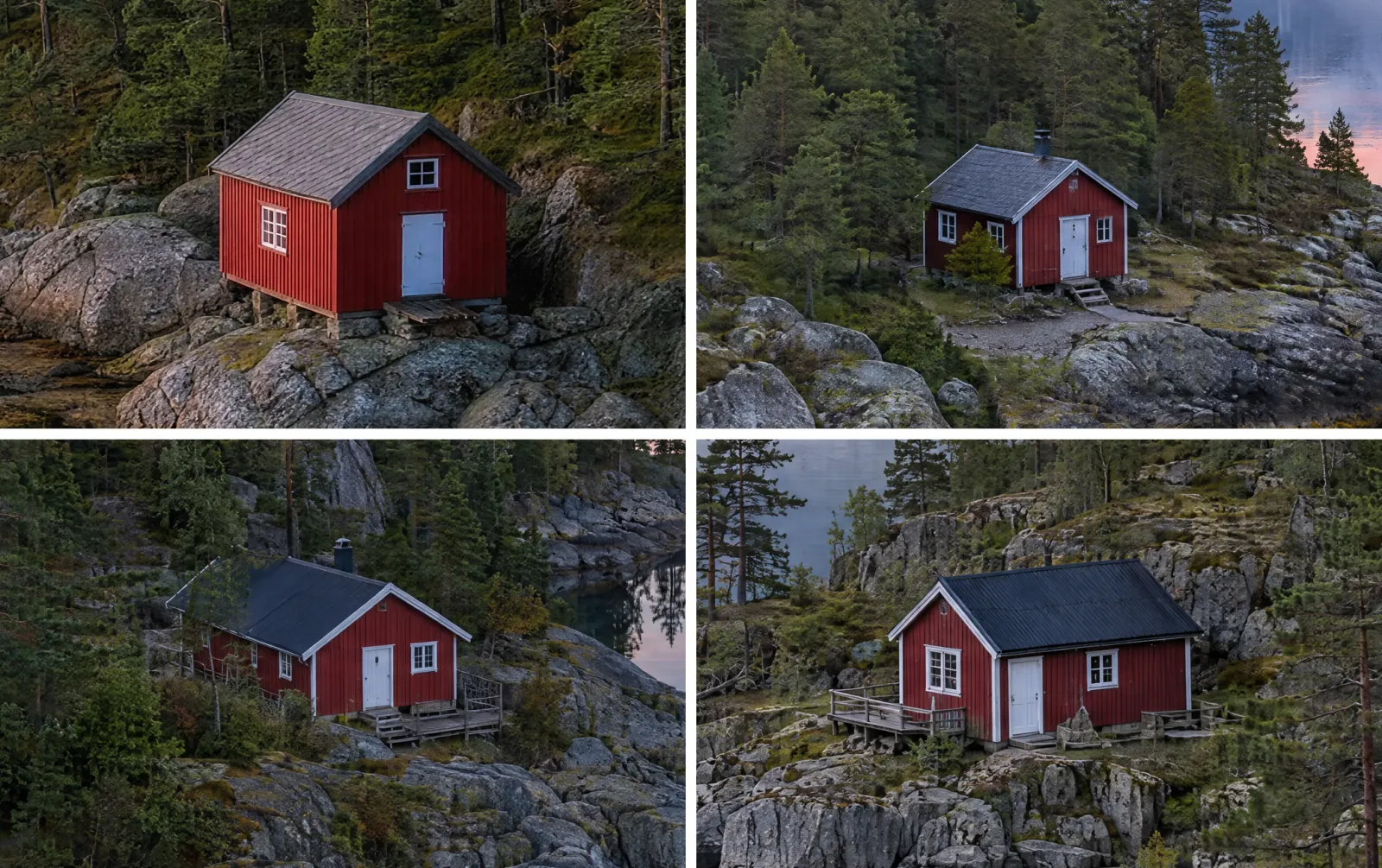
1024×640 crops at 100% from each 3840×2160 render. Top left: GPT Image 2 (high). Top right: GPT Image 2.5 Flare (high). Bottom left: GPT Image 2.5 Flare (max). Bottom right: GPT Image 2.5 Sunburst (max).
Test 5: social thumbnail at the cheapest usable tier
The prompt was a top-down ramen bowl on a yellow background at 1024×1024, run three times per configuration. All 12 outputs were usable. Flare at high produced three clean, consistent bowls with a median of 25.1 seconds and a list price of $0.053 each. GPT Image 2 at high needed a median of 152.6 seconds at $0.211, and its first run scattered scallions across the background outside the bowl. Flare at max took a median of 58.8 seconds and Sunburst at max 128.4 seconds, both at $0.211. For thumbnails, Flare at high delivers a usable image in one-sixth of the time at one-quarter of the price of the GPT Image 2 baseline.
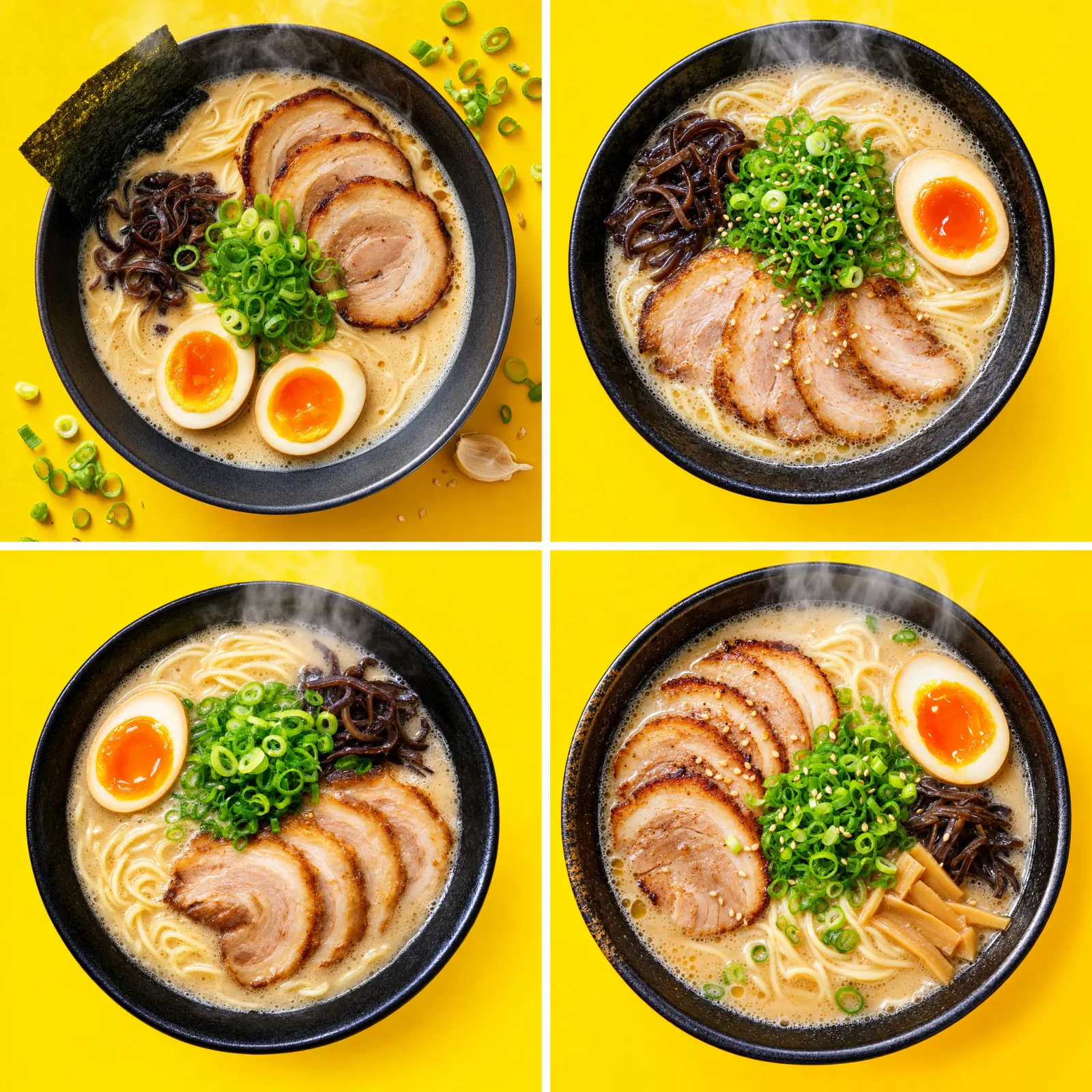
First of three runs per configuration. Top left: GPT Image 2 (high). Top right: GPT Image 2.5 Flare (high). Bottom left: GPT Image 2.5 Flare (max). Bottom right: GPT Image 2.5 Sunburst (max).
Results at a glance
| Test | GPT Image 2 (high) | GPT Image 2.5 Flare (high) | GPT Image 2.5 Flare (max) | GPT Image 2.5 Sunburst (max) |
|---|---|---|---|---|
| 1. Poster text: characters correct, time | 37/37, 116.0 s | 37/37, 26.0 s | 37/37 plus 2 stray periods, 54.5 s | 37/37, 96.1 s |
| 2. Reference edit: subject kept, time | Yes (slightly squatter), 137.2 s | Yes, 36.6 s | Yes, 68.9 s | Yes, 107.9 s |
| 3. Edit chain: unintended changes over 2 turns, time per turn | 4, about 136 s | 1, about 30 s | 4, about 62 s | 0, about 107 s |
| 4. 4K detail: rank at 100%, time, list price | 3rd, 105.4 s, $0.401 | 4th, 31.0 s, $0.100 | 2nd, 75.1 s, $0.400 | 1st, 91.5 s, $0.400 |
| 5. Thumbnail: median of 3 runs, list price | 152.6 s, $0.211 | 25.1 s, $0.053 | 58.8 s, $0.211 | 128.4 s, $0.211 |
Measured on fal.ai's queue API on September 10, 2026. Times are wall-clock from submission to completion; single runs except row 5. Prices are fal.ai list prices per output image and exclude input tokens for the reference images.
How much faster is GPT Image 2.5 than GPT Image 2?
OpenAI's claim is "up to 50% lower latency" for Flare relative to GPT Image 2 (OpenAI). Third-party figures published since launch are in the same range or higher: WeShop measured Flare 30% to 52% faster at identical settings (WeShop), and Manus reported Flare at two to four times the speed of GPT Image 2 on its own workloads before launch (BuildFastWithAI).
Our same-queue numbers on fal.ai are larger than OpenAI's claim. At 1024×1024, Flare at high returned a median of 25.1 seconds against 152.6 seconds for GPT Image 2 at high, an 84% reduction, or about six times faster. Flare at max, the cost-matched tier, returned 58.8 seconds, a 61% reduction. Sunburst at max returned 128.4 seconds, 16% faster than GPT Image 2 while producing the most detailed output of the four. One oddity: GPT Image 2 took longer on the 1024×1024 thumbnails than on the 3840×2160 landscape (152.6 versus 105.4 seconds), which suggests that its time is dominated by the planning step rather than by pixel count. These are fal.ai queue times on a single day, and OpenAI's direct API may behave differently, so treat the ratios as indicative rather than definitive.
Is GPT Image 2.5 better than GPT Image 2 on independent benchmarks?
Early votes say yes, with a caveat about sample size. On the Arena text-to-image leaderboard dated September 7, 2026, gpt-image-2.5-sunburst leads at 1421 ± 13 and gpt-image-2.5-flare sits second at 1399 ± 13, both marked preliminary. gpt-image-2 at medium quality holds third at 1381 ± 4. The gap between Sunburst and GPT Image 2 is 40 points, but the two new entries have 3,149 and 2,856 votes against 78,731 for GPT Image 2, so the confidence intervals are three times wider.
The Artificial Analysis text-to-image arena had not added either 2.5 model as of September 10, 2026. Its board still lists GPT Image 2 (high) first with an Elo of 1171 across 15,381 samples, ahead of MAI-Image-2.6 at 1144 and Nano Banana 2 at 1122. Until GPT Image 2.5 accumulates votes there, the honest summary is that GPT Image 2 remains the top model on one independent board and GPT Image 2.5 leads on the other with preliminary data.
Can you choose Flare or Sunburst in ChatGPT?
No. ChatGPT does not expose a picker between the two Images 2.5 models. The Decoder tested both consumer surfaces after launch and found that Chat mode "often" routed to the weaker model while Work mode "consistently" used the stronger one, and that Chat mode edits altered unrelated details more often (The Decoder, Sep 2026). OpenAI's documentation does not say which variant ChatGPT selects in a given situation.
Images 2.5 rolled out on launch day to every ChatGPT tier, including free, plus ChatGPT Work and Codex, on desktop, mobile, and web (OpenAI via 9to5Mac). Paid plans buy shorter wait times and higher usage limits rather than a different model. For repeatable results, the API model ids or a platform that shows the toggle are the only ways to guarantee Flare or Sunburst. LoveGen AI shows the two variants as side-by-side cards on the GPT Image 2.5 page, so the choice is explicit for every generation.
Which should you use? GPT Image 2 vs Flare vs Sunburst by job
| Job | Recommended model | Quality tier | Why |
|---|---|---|---|
| Social thumbnails, high-volume variants | GPT Image 2.5 Flare | medium or high | Lowest cost per usable image and the fastest generation in our tests |
| E-commerce product edits from a reference photo | GPT Image 2.5 Sunburst (or Flare at high) | high or xhigh | Both kept the mug, logo, and background fixed in our chain test; Sunburst was cleanest |
| Multi-round client revisions | GPT Image 2.5 Sunburst | xhigh or max | Zero unintended changes across our three-turn chain; GPT Image 2 and Flare at max each made four |
| Multilingual posters at 2K on a budget | GPT Image 2 | high (LoveGen AI: 0.3 credit) | Still first on Artificial Analysis; flat 0.3 credit on LoveGen AI beats 2.5 High at 0.5 |
| Print, key visuals, 4K wallpapers | GPT Image 2.5 Sunburst or Flare | max | Only 2.5 exposes the max tier; 4K max costs $0.400 on fal.ai, same as GPT Image 2 high |
| API integrations that need throughput | GPT Image 2.5 Flare | auto or high | Same rate limits as GPT Image 2 with lower latency per image |
Stay on GPT Image 2 when
You need 2K output with strong text and you are paying per credit on LoveGen AI, where GPT Image 2 costs 0.3 credit against 0.5 for GPT Image 2.5 at the equivalent size and tier. You also stay when a pipeline has been tuned against GPT Image 2 outputs and has not been re-validated, since 2.5's edits behave differently by design.
Pick GPT Image 2.5 Flare when
Speed and volume matter more than the last increment of detail. In our tests Flare at high returned a 1024×1024 image in a median of 25.1 seconds, six times faster than GPT Image 2, and held a three-turn edit chain steady. OpenAI positions Flare as the default for "creator and social content, product experiences, visual search, rapid image prototyping, and high-volume generation" (OpenAI), and the same-price token card means there is no premium for the speed.
Pick GPT Image 2.5 Sunburst when
The deliverable will be edited more than once, or a reference subject must survive a style or scene change intact. Sunburst is the model OpenAI built "for premium visual workflows that benefit from tighter control across edits," third-party testing reported by WeShop found it drifted about 40% less outside the target region than Flare (WeShop, Sep 2026), and it was the only configuration with zero unintended changes in our three-turn chain. It also produced the sharpest 4K render of the four.
When an OpenAI model is not the best fit
For edits that need more than six reference images, or for natural-language editing of photographs where identity must hold across a dozen inputs, Google's Nano Banana Pro accepts up to 14 reference images on LoveGen AI. For typography-first layouts, Ideogram 3 remains a specialist, and for studio-grade photorealism without text, Flux 2 Pro is still a strong alternative. All of these run under the same credit balance, so testing the same prompt across models costs a fraction of a credit.
Is GPT Image 2 deprecated? Should you migrate now?
GPT Image 2 is not deprecated as of September 10, 2026. OpenAI's deprecations page lists no retirement date for gpt-image-2, and the gpt-image-2 model page remains live with its 2026-04-21 snapshot. OpenAI has not said when, or whether, GPT Image 2 will follow the DALL-E models into retirement.
For new work, starting on GPT Image 2.5 is the sensible default, and OpenAI's own guidance is to begin with Flare and move to Sunburst only when quality requirements demand it (OpenAI Developer Community). A migration checklist for existing integrations:
- Change the model id to
gpt-image-2.5-flareorgpt-image-2.5-sunburst. - Remap
quality. Oldhighbecomes newmaxif you want the same output token budget; oldmediumbecomes newhigh. - Set
qualityexplicitly. The new models default toauto, which lets OpenAI pick the tier. - Re-check edit prompts. 2.5 changes only what you ask for; prompts that relied on GPT Image 2 re-rendering the whole frame may need to describe the desired global change.
- Consider
background: "opaque"if transparent or auto backgrounds caused surprises. - Budget from fal.ai or OpenAI usage data, not the GPT Image 2 calculator, which OpenAI says does not cover 2.5.
FAQ
When was GPT Image 2.5 released?
OpenAI released GPT Image 2.5 on September 8, 2026, under the consumer name ChatGPT Images 2.5. The API exposes two models, gpt-image-2.5-flare and gpt-image-2.5-sunburst, both with a 2026-09-08 snapshot. It rolled out the same day to all ChatGPT tiers, including free, plus ChatGPT Work and Codex, on desktop, mobile, and web (OpenAI).
What is the difference between GPT Image 2.5 Flare and Sunburst?
Flare is OpenAI's default model: higher quality than GPT Image 2 at up to 50% lower latency, aimed at social content, product experiences, and high-volume generation. Sunburst is the larger precision model with longer generation times, built for campaign creative and multi-round edits where every revision must leave the rest of the image untouched. Both share the same token pricing (OpenAI).
Is GPT Image 2.5 better than GPT Image 2?
On Arena's preliminary September 2026 text-to-image board, GPT Image 2.5 Sunburst scores 1421 and Flare 1399, versus 1381 for gpt-image-2 (medium), though the new entries have about 3,000 votes against 78,000 (Arena). OpenAI claims sharper detail, more natural lighting, better reference-photo preservation, and more reliable multi-turn edits. Artificial Analysis still lists GPT Image 2 first because 2.5 has not been added yet.
Does GPT Image 2.5 cost more than GPT Image 2?
Not per token. Both charge $5 per million text input tokens, $8 per million image input tokens, and $30 per million image output tokens (OpenAI). Per image, the ladder shifted: on fal.ai a 1024×1024 GPT Image 2.5 image costs about $0.006 at low, $0.053 at high, and $0.211 at max, while GPT Image 2 costs $0.006 at low, $0.053 at medium, and $0.211 at high.
What are the new xhigh and max quality tiers?
GPT Image 2.5 adds xhigh and max above high; GPT Image 2 stops at high. Both 2.5 models default to auto (OpenAI guide). At 1024×1024, fal.ai lists xhigh at $0.094 and max at $0.211 per image; at 3840×2160, xhigh is $0.178 and max $0.400 (fal.ai). Max is the tier that matches GPT Image 2's old high output cost.
Does GPT Image 2.5 support 4K?
Yes. OpenAI's image generation guide allows custom resolutions where each edge is a multiple of 16, no edge exceeds 3840 pixels, total pixels fall between 655,360 and 8,294,400, and aspect ratio stays between 1:3 and 3:1. Resolutions above 2560×1440 are flagged experimental (OpenAI guide). On LoveGen AI, GPT Image 2.5 offers 3840×2160 and 2160×3840 directly, while GPT Image 2 is limited to 2K.
Can I choose Flare or Sunburst inside ChatGPT?
No. ChatGPT does not expose a model picker for Images 2.5. The Decoder reported that Chat mode often routed to the weaker variant while Work mode consistently used the stronger one, and unrelated details changed more often in Chat mode edits (The Decoder). To control the variant, use the API model ids or a platform such as LoveGen AI that shows a Flare/Sunburst toggle.
Is GPT Image 2 deprecated?
Not as of September 10, 2026. OpenAI's deprecations page lists no retirement date for gpt-image-2, and its model page remains live with the 2026-04-21 snapshot. OpenAI does note that its GPT Image 2 cost calculator does not estimate token consumption for the 2.5 models (OpenAI), so budget separately before switching.
How much faster is GPT Image 2.5 than GPT Image 2?
OpenAI states Flare cuts latency by up to 50% versus GPT Image 2 (OpenAI). Third-party testing reported by WeShop puts Flare 30% to 52% faster at identical settings, and Manus measured two to four times faster on its own workloads before launch (BuildFastWithAI). Our same-queue test on fal.ai on September 10, 2026 recorded medians of 25.1 seconds for Flare at high, 58.8 seconds for Flare at max, and 152.6 seconds for GPT Image 2 at high per 1024×1024 image.
Which model is better for editing with reference photos?
GPT Image 2.5 Sunburst. OpenAI built it for tighter control across successive edits, and it is better at keeping reference subjects recognisable across new settings and styles (OpenAI). WeShop's testing found Sunburst drifted about 40% less outside the target region than Flare (WeShop). In our three-turn chain on September 10, 2026, Sunburst at max made zero unintended changes, Flare at high one, and GPT Image 2 four, because it re-rendered the whole scene on the second turn.
How many credits does GPT Image 2.5 cost on LoveGen AI?
From 0.1 credit per image. The default 1024×1024 at High costs 0.5 credit, Extra High 0.8, and Max 1.8; a 3840×2160 Max render is the ceiling at 3.4 credits. Flare and Sunburst cost the same. GPT Image 2 on LoveGen AI is a flat 0.3 credit per image with up to four reference images, so it remains the cheaper choice for 2K work.
Should I switch my API integration from gpt-image-2 to gpt-image-2.5?
Yes for new work, with one change: remap quality. A request that used gpt-image-2 with quality: "high" should use gpt-image-2.5-flare with quality: "max" to keep the same output token budget; leaving high in place produces a cheaper, lower-token image (fal.ai pricing). Also note the new auto default, the opaque background option, and that Sunburst adds latency.
Conclusion
GPT Image 2.5 is a real upgrade over GPT Image 2 on edits, reference fidelity, and speed, and it costs the same per token. The one thing to internalise before switching is that the quality names moved: max is the new high, and high is the new medium. Flare is the right default for most work, Sunburst earns its extra seconds when a subject has to survive several rounds of edits, and GPT Image 2 is still worth keeping for cheap 2K text-heavy work, especially at 0.3 credit on LoveGen AI.
Both generations run side by side with every other major model on the AI image models catalogue on LoveGen AI, with no subscription and per-image pricing. At the time of writing, LoveGen AI is also offering GPT Image 2.5 free to try, which is the cheapest way to run the five prompts above on your own subjects.